
Use Agents
What Is an Agent?
An Agent is a "skill pack" installed in the robot's brain. It can also be understood as an application running on the robot. Like switching apps on a phone, switching Agents lets the robot enter the corresponding capability scenario and use different interaction methods and task capabilities.
How to Switch Agents
-
Switch via the mobile App
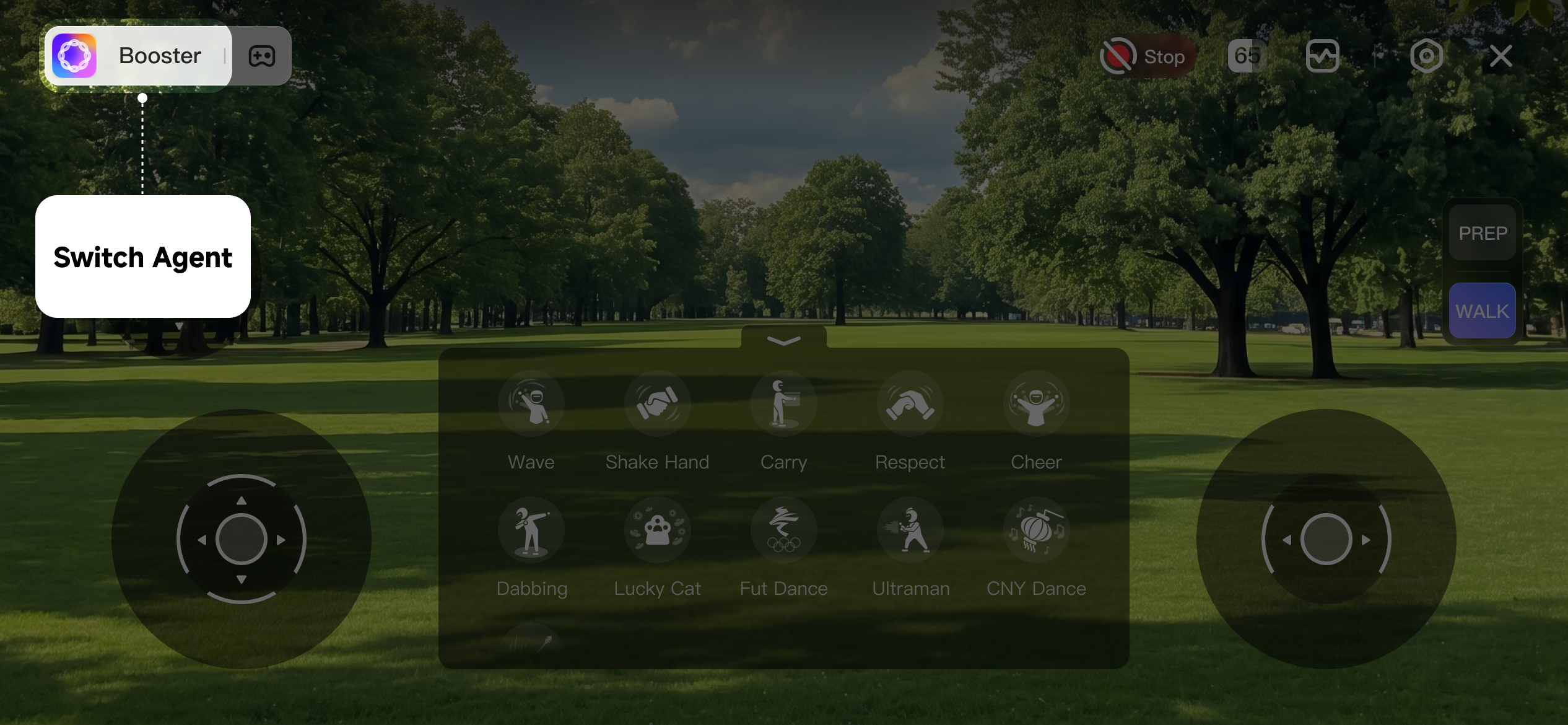
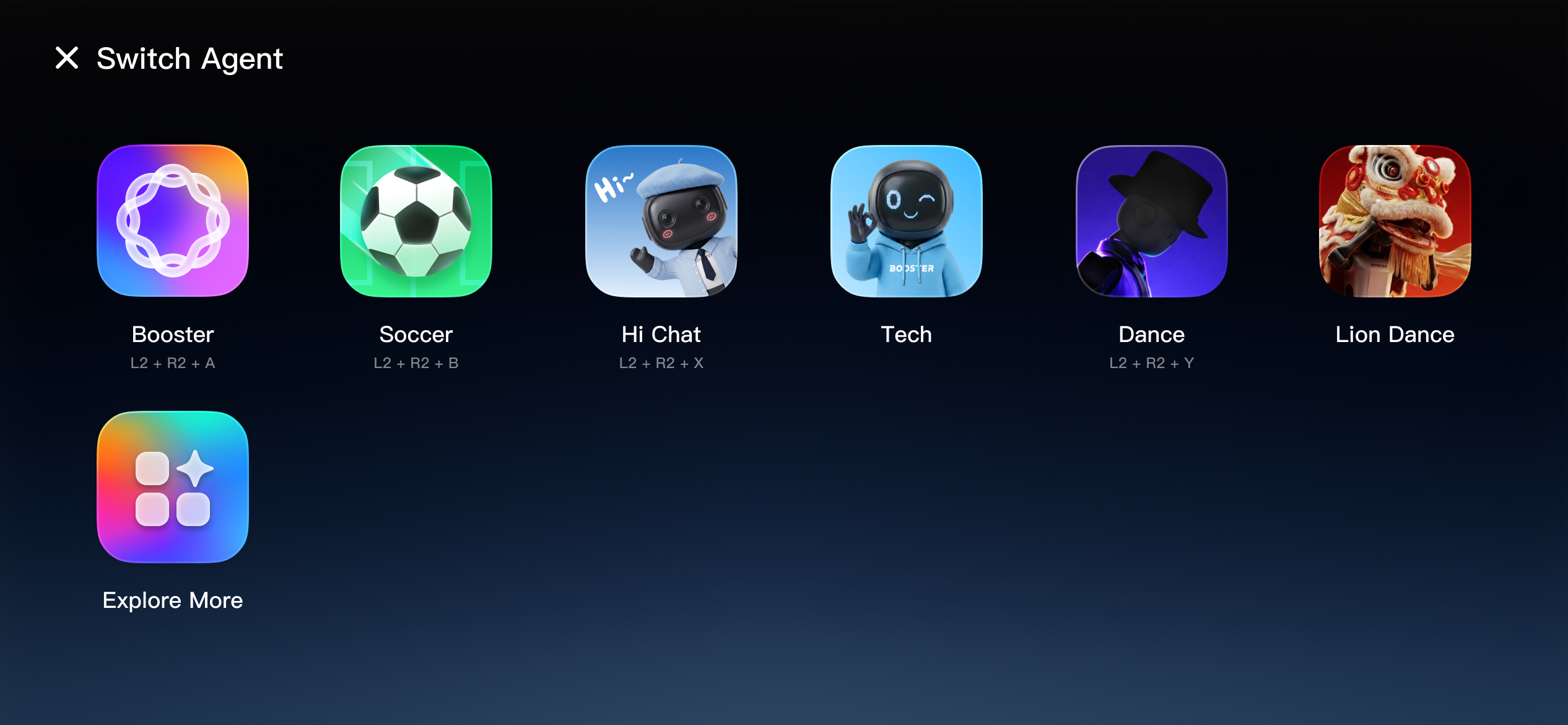
- Tap the Agent name in the top-left corner to switch to another Agent. Each Agent has different capabilities — for example, Soccer Master can play soccer with you, Hi Chat can talk with you using different personas, and Dance Master can perform a variety of dances from around the world.
-
Switch via the Joystick
Switch Agents
Booster joystick buttons
Xbox joystick buttons
Enter Booster Agent
L2 + R2 + A
LT + RT + A
Enter Soccer Agent
L2 + R2 + B
LT + RT + B
Enter Hi Chat Agent
L2 + R2 + X
LT + RT + X
Enter Dance Agent
L2 + R2 + Y
LT + RT + Y
Enter Lion Dance Agent
L2 + R2 + UP
LT + RT + UP
Official Agents
Booster K1 includes 6 official Agents covering entertainment, conversation, teaching, competition, and other scenarios.
Booster
A general-purpose basic Agent that supports daily actions such as waving, handshaking, and bowing with folded hands. It can also perform several fun dances for everyday interaction scenarios.
Functions list
Functions | Booster joystick buttons | Xbox joystick buttons | Prerequisites |
|---|---|---|---|
Shake Hand | A | A | Under WALK mode |
Wave | B | B | Under WALK mode |
Ultraman | X | X | Under WALK mode |
Respect | Y | Y | Under WALK mode |
Lucky Cat | R + A | RB + A | Under WALK mode |
Dabbing | R + B | RB + B | Under WALK mode |
Cheer | R + X | RB + X | Under WALK mode |
Carry | R + Y | RB + Y | Under WALK mode |
CNY Dance | L + UP | LB + UP | Under WALK mode |
Rock Dance | L + LEFT | LB + LEFT | Under WALK mode |
Future Dance | L + RIGHT | LB + RIGHT | Under WALK mode |
Get Up | L2 + UP | LT + UP | Under DAMP/PREP mode |
Soccer
Designed for soccer scenarios. It can autonomously track, chase, kick, and shoot the ball, and can accurately reproduce signature celebration moves from soccer stars such as Cristiano Ronaldo and Messi.
Functions list
Functions | Booster joystick buttons | Xbox joystick buttons | Prerequisites |
|---|---|---|---|
Shake Hand | A | A | Under WALK mode |
Wave | B | B | Under WALK mode |
Get Up | L2 + UP | LT + UP | Under DAMP/PREP mode |
Track Ball | L2 + A | LT + A | Under WALK mode |
Chase Ball | L2 + B | LT + B | Under WALK mode |
Kick Ball | L2 + X | LT + X | Under WALK mode |
Power Kick | L2 + Y | LT + Y | Under WALK mode |
Siuuu | L + Y | LB + Y | Under WALK mode |
Arms Crossed | L + B | LB + B | Under WALK mode |
Point to Sky | L + UP | LB + UP | Under WALK mode |
Cradle Dance | L + DOWN | LB + DOWN | Under WALK mode |
Hi Chat
An intelligent conversational Agent that can switch flexibly among fun personas such as a cute child, tutor, or pet, meeting needs for casual chat and entertaining companionship.
See details in Voice Interaction。
Functions list
Functions | Booster joystick buttons | Xbox joystick buttons | Prerequisites |
|---|---|---|---|
Default | L2 + A | LT + A | Under WALK mode |
XiaoBao | L2 + B | LT + B | Under WALK mode |
Gentle Ella | L2 + X | LT + X | Under WALK mode |
Grumpy Jax | L2 + Y | LT + Y | Under WALK mode |
English Tutor | L2 + UP | LT + UP | Under WALK mode |
Cute Pet | L2 + DOWN | LT + DOWN | Under WALK mode |
Alien Weirdo | L2 + LEFT | LT + LEFT | Under WALK mode |
Say Hello | R2 + Y | RT + Y | Enable chat |
Teach
A hands-on learning Agent. Users physically guide the robot through a motion, and the device quickly recognizes and accurately reproduces it, making custom actions easy to create.
Dance
Specialized in a wide range of Chinese and Western dances, including folk, trendy, and classic dance moves, while also mastering advanced actions such as roundhouse kicks.
Full-body dances require a dedicated venue. Rubber, cement, or tile floors are recommended; high-resistance surfaces such as carpet increase the risk of falling.
Functions list
Functions | Booster joystick buttons | Xbox joystick buttons | Prerequisites |
|---|---|---|---|
Rock Dance | L + A | LB + A | Under WALK mode |
CNY Dance | L + B | LB + B | Under WALK mode |
Future Dance | L + X | LB + X | Under WALK mode |
MJ Dance | L + Y | LB + Y | Under WALK mode |
Arabic Dance | L + DOWN | LB + DOWN | Under WALK mode |
Boxing Style Kick | L + LEFT | LB + LEFT | Under WALK mode |
Roundhouse Kick | L + RIGHT | LB + RIGHT | Under WALK mode |
Mounts & Pals | L + R + A | LB + RB + A | Under WALK mode |
Reform Breeze | L + R + B | LB + RB + B | Under WALK mode |
Lion Dance
Focused on traditional folk performance, skillfully performing authentic Southern-style lion dance and showcasing the charm of traditional Chinese culture.
Functions list
Functions | Booster joystick buttons | Xbox joystick buttons | Prerequisites |
|---|---|---|---|
Dance Prepare | L + A | LB + A | Under DAMP/PREP mode |
Dance Walk | L + B | LB + B | Under WALK mode |
Lion Dance 1 | L + X | LB + X | Under WALK mode |
Lion Dance 2 | L + Y | LB + Y | Under WALK mode |